

Table of Contents
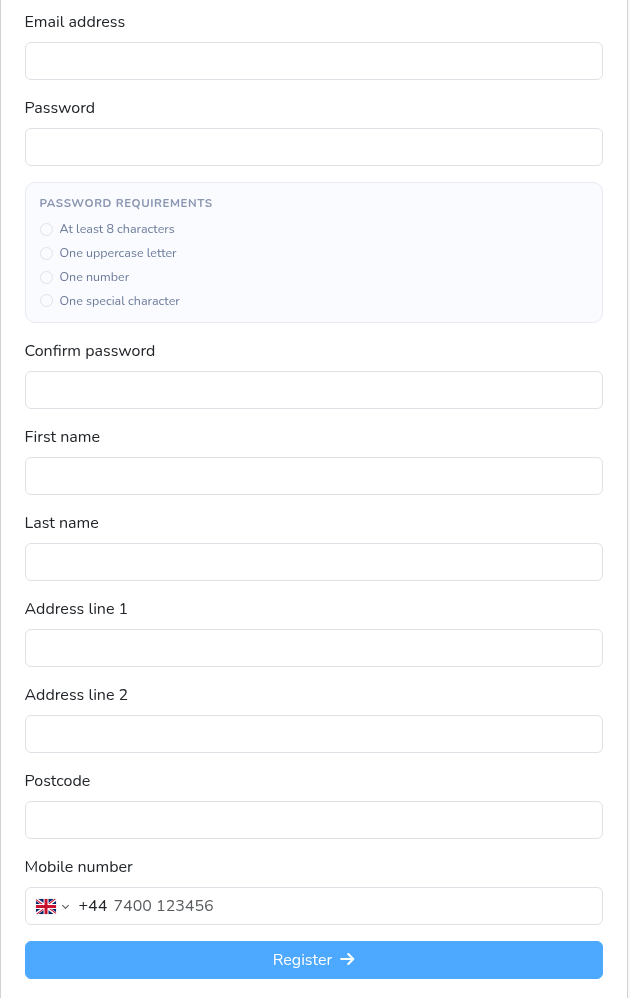
When a parent creates an account on your club’s booking page, they fill in one short form. This guide lists exactly what that form asks for and what’s required, including the address, so you know what details you’ll have for each family.
The sign-up form #
- Email address: required. This is also what they log in with.
- Password and Confirm password: required. The password must be at least 8 characters and include an uppercase letter, a number and a special character; the form shows these requirements as they type.
- First name and Last name: required, at least 2 characters each.
- Address line 1: required, and it must be at least 10 characters long.
- Address line 2: optional.
- Postcode: optional.
- Mobile number: optional, but if one is entered it must be a valid number (10 to 15 digits).
- There’s no town or city field.
Adding a child #
- When parents add a child, they aren’t asked for an address. The child uses the parent’s account details.
Can I make the postcode or address required? #
- There’s no club setting that changes which of these fields are required. Every club’s sign-up form works the same way.
- If you need a postcode or full address, add it as a required registration question. See How to Add Required Registration Questions for Parents.
- Registration questions are asked for each child. Right now there’s a known issue: the first child a parent adds while signing up isn’t asked your registration questions. We’re fixing this. Until then, check new members’ answers and follow up with any family whose first child is missing them.
Editing a parent’s details #
- When you edit a parent’s details from their member profile, Address line 1 and Post code must both be filled in before you can save. Because the postcode is optional at sign-up, you may need to ask the family for it first.
FAQs #
- Is it right that parents don’t have to add an address? Partly. Parents must fill in the first line of their address, but the postcode and second line are optional, and there’s no town field.
- Can I make the postcode required? Not on the sign-up form itself. Add a required registration question instead (see above).
- Are parents asked for their address at checkout? No. They’re only asked when they sign up.
- Why can’t I save a parent’s details? Check that Address line 1 and Post code are filled in. Both are needed when you edit a parent.
- Why was a parent’s address rejected? The first line needs at least 10 characters. A very short address, such as ‘1 High St’, may need the full street name, for example ‘1 High Street’.


